
Introduction Last updated: 2026-09-01
EdiNation is a free EDI editor and validator that runs in your browser. This page is for anyone evaluating EdiNation: it explains how your EDI data stays on your device, what the editor does, which network calls it makes, and which standards it supports.
Your EDI data is safe
EDI file contents are processed locally in your browser with WebAssembly. Parsing, validation, and acknowledgments all run on your device, so the EDI payload stays there.
The app downloads EDI models and specs and checks authentication with api.edination.com. Those requests carry your API key and the transaction or model identifiers; the EDI file itself stays local.
Note
Your EDI data stays in your browser, on your device, at all times.
How to check privacy yourself
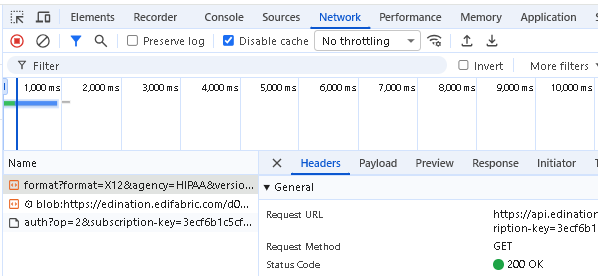
- Open the browser developer tools (F12) and go to the Network tab.
- Load or parse a sample EDI file.
- Confirm that no request body contains the EDI or PHI data.
- Confirm that the only calls are the model and authentication calls described in Is EdiNation fully offline?
EdiNation is a simple editor and validator for EDI files
With EdiNation, you can do the following, directly in your browser:
- Analyze if your EDI files are compliant with their specs
- Cross-reference any validation errors with the spec
- View, edit, and format EDI files
- Generate 997, 999, or TA1 acknowledgments
- Convert between EDI X12 and JSON
- Explore and download EDI specs
- Import SEF or custom OpenEDI specs
EdiNation is safe and fast
EdiNation is a lightweight HTML and JavaScript web application built on top of WebAssembly. All EDI operations, like parsing, validation, and acknowledgments, are local, and EDI data stays in the browser.
- Your EDI content stays on your device
- All EDI processing is local, in your browser process
- Your EDI files and data are not cached in the browser
- Any files you upload or paste into EdiNation remain on your machine
- Local processing makes EdiNation fast
Note
The old EdiNation portal processes files on our servers and is not HIPAA compliant.
EdiNation is free and unlimited
EdiNation is entirely free and lets you parse, format, validate, and acknowledge any number of EDI files, regardless of size.
- All EdiNation features are free
- Open it and start working, with no account and no hidden fees
- Files of any size
- Any number of operations and files
- Nothing to install, and no email address or serial key to configure
Is EdiNation fully offline?
No. Although all EDI operations, such as parsing, validation, and acknowledgments, are entirely offline, executed in the browser process on your machine, EdiNation makes the following calls over the Internet:
- HTTP GET https://api.edination.com/wa/v1/format
This call loads the EDI model for parsing and validation. EDI models are the blueprints for every EDI message type and define the structure and all properties that constitute an invoice, a claim, or something else. To learn more about how EdiNation represents EDI models, see EDI models.
The information sent to our cloud API is your API key and the name of the EDI model. When no model name is supplied, the identification of each EDI transaction, such as the transaction ID, version, and EDI standard, is sent instead.
- HTTP GET https://api.edination.com/wa/v1/auth
This call authenticates the sender. It sends over either your paid API key or the default API key for the free plan, whichever is configured in the portal.
Note
You must ensure that your network allows calls to the two endpoints listed above for EdiNation to work properly.
Supported EDI standards
The new portal supports X12 ASC and X12 HIPAA, and the remaining EDI standards are being added. Until then, use the old EdiNation portal for other standards. The old portal remains on the previous free plan, with 50 operations per day. The old portal will be decommissioned once all EDI standards have been migrated to the new portal.
Next steps
To learn more about how to translate and validate EDI files with EdiNation, try these tutorials: