Validate EDI files Last updated: 2026-08-21
Validate EDI resources with the HTTP POST Method
In order to validate EDI documents according to the implementation guide for each standard and version use the following resources with the POST method:
You can validate EDI transactions for the following EDI standards. To do so, execute HTTP POST to the resource URL, with the request body being the relevant EdiNation resource.
X12
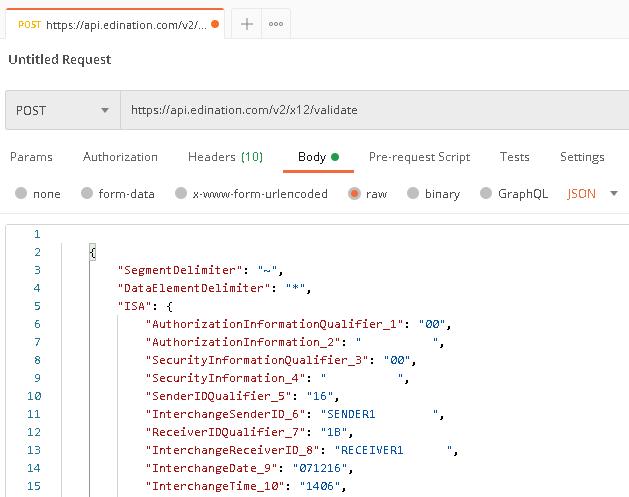
The request body must be an X12Interchange. Execute HTTP POST to the resource URL, with the request included as application/json content.
- URL:
https://api.edination.com/v2/x12/validate - Header:
Ocp-Apim-Subscription-Key: {API key} - Request: X12Interchange
- Response: OperationDetails
The response will contain validation details, encoded in application/json format.
EDIFACT
The request body must be an EdifactInterchange. Execute HTTP POST to the resource URL, with the request included as application/json content.
- URL:
https://api.edination.com/v2/edifact/validate - Header:
Ocp-Apim-Subscription-Key: {API key} - Request: EdifactInterchange
- Response: OperationDetails
The response will contain validation details, encoded in application/json format.
HL7
The request body must be an Hl7Interchange. Execute HTTP POST to the resource URL, with the request included as application/json content.
- URL:
https://api.edination.com/v2/hl7/validate - Header:
Ocp-Apim-Subscription-Key: {API key} - Request: Hl7Interchange
- Response: OperationDetails
The response will contain validation details, encoded in application/json format.
VDA
The request body must be an FlatMessage. Execute HTTP POST to the resource URL, with the request included as application/json content.
- URL:
https://api.edination.com/v2/vda/validate - Header:
Ocp-Apim-Subscription-Key: {API key} - Request: FlatMessage
- Response: OperationDetails
The response will contain validation details, encoded in application/json format.
NCPDP
The request body must be an NcpdpTransmission. Execute HTTP POST to the resource URL, with the request included as application/json content.
- URL:
https://api.edination.com/v2/ncpdp/validate - Header:
Ocp-Apim-Subscription-Key: {API key} - Request: NcpdpTransmission
- Response: OperationDetails
The response will contain validation details, encoded in application/json format.
Example with Postman: