Convert between EDI and JSON Last updated: 2026-10-01
ediFabric Cloud reads an EDI file into JSON and writes JSON back to EDI over HTTPS. This example is a HIPAA 5010 837P professional claim. The transaction object uses the names from the OpenEDI model, which are the same names as the ediFabric EDI template. How .NET, Native and Cloud share that model is in Convert between EDI and JSON.
The 837P model
Cloud already has the standard models. A professional claim is model EdiNation.X12.HIPAA.005010, message 837P, version 005010X222A1. You can read the definition in the EDI spec library. Download, then As OpenEDI JSON, saves en-837P-openedi.json.
The message schema starts like this. OpenEDI format explains x-openedi-message-id, x-openedi-segment-id and x-openedi-element-id.
{
  "TS837P": {
    "type": "object",
    "x-openedi-message-id": "837",
    "x-openedi-message-standard": "X12",
    "x-openedi-message-version": "005010X222A1",
    "properties": {
      "Model": { "type": "string" },
      "ST": { "$ref": "#/components/schemas/ST" },
      "BHT_BeginningOfHierarchicalTransaction": { "$ref": "#/components/schemas/BHT_BeginningOfHierarchicalTransaction_8" },
      "AllNM1": { "$ref": "#/components/schemas/All_NM1_837P_6" },
      "Loop2000A": { "type": "array", "items": { "$ref": "#/components/schemas/Loop_2000A_837P" } },
      "SE": { "$ref": "#/components/schemas/SE" }
    }
  }
}
Send the serial key on every request as the Ocp-Apim-Subscription-Key header. The read and write URLs for the other standards are in Translate EDI resources with the HTTP POST method.
Read an 837P file
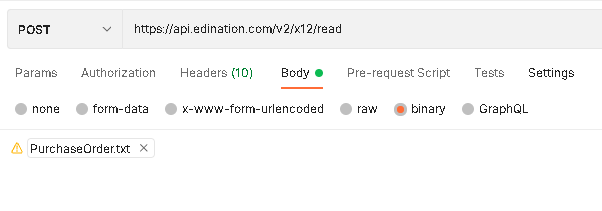
POST the file to /v2/x12/read. The body is the raw EDI. The response is application/json: an array of X12Interchange objects, one per ISA/IEA. A typical file has one item in that array.
curl -X POST "https://api.edination.com/v2/x12/read" \
  -H "Ocp-Apim-Subscription-Key: YOUR_SERIAL_KEY" \
  -H "Content-Type: application/octet-stream" \
  --data-binary @Claim.txt
The JSON
The 837P sits at Groups[0].Transactions[0]. Its property names are the OpenEDI properties, and the same names Newtonsoft produces from the .NET template. "Model" selects the HIPAA 5010 model:
{
  "Groups": [{
    "Transactions": [{
      "Model": "EdiNation.X12.HIPAA.005010",
      "ST": {
        "TransactionSetIdentifierCode_01": "837",
        "TransactionSetControlNumber_02": "0021",
        "ImplementationConventionPreference_03": "005010X222A1"
      },
      "BHT_BeginningOfHierarchicalTransaction": {
        "HierarchicalStructureCode_01": "0019",
        "TransactionSetPurposeCode_02": "00",
        "SubmitterTransactionIdentifier_03": "244579",
        "TransactionSetCreationDate_04": "20061015",
        "TransactionSetCreationTime_05": "1023",
        "TransactionTypeCode_06": "CH"
      }
    }]
  }]
}
Why TransactionSetIdentifierCode_01 is element 143, and why BHT_BeginningOfHierarchicalTransaction is the BHT segment, is in the OpenEDI format and in the EDI template for the same class, TS837P. The full claim is on the 837P transaction page. The envelope around it, ISA through IEA, is the X12Interchange example.
Write the JSON back to EDI
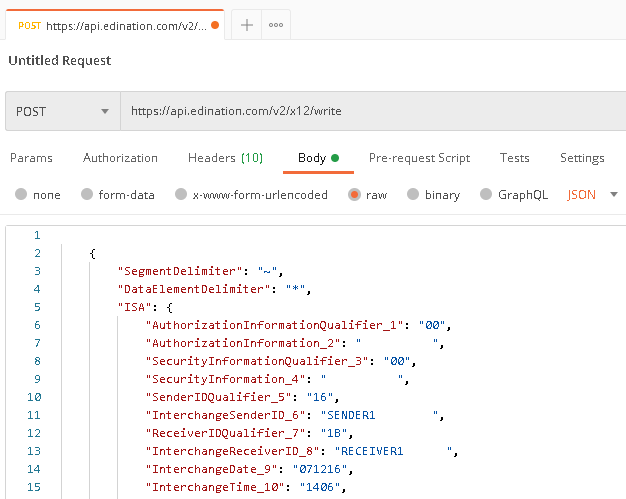
POST a single X12Interchange (one element of the array from /read) to /v2/x12/write. The body is the object you got from /read, or one you built with the same property names. The response is the EDI file.
curl -X POST "https://api.edination.com/v2/x12/write" \
  -H "Ocp-Apim-Subscription-Key: YOUR_SERIAL_KEY" \
  -H "Content-Type: application/json" \
  --data-binary @Claim.json \
  -o Claim.txt
Claim.json is a single interchange. If you saved the /read response as an array, pass the first element. /validate checks that interchange before you write it. See Validate EDI files.
Translate EDI resources with the HTTP POST method
To translate from EDI or to EDI, POST to the resource URL for that standard. The HIPAA 5010 837P sections above are the worked X12 example. Send Ocp-Apim-Subscription-Key on every request.
Read EDI file into JSON
The request body is the file as binary or form-data. The response is application/json: an array of interchanges.
X12
- URL:
https://api.edination.com/v2/x12/read - Response: array of X12Interchange
The 837P call is in Read an 837P file.
EDIFACT
- URL:
https://api.edination.com/v2/edifact/read - Response: array of EdifactInterchange
HL7
- URL:
https://api.edination.com/v2/hl7/read - Response: array of HL7Interchange
VDA
- URL:
https://api.edination.com/v2/vda/read - Response: array of FlatMessage
NCPDP
- URL:
https://api.edination.com/v2/ncpdp/read - Response: array of NcpdpTransmission
Example with Postman:
Write JSON to EDI file
POST a single interchange (one element of the array from read) as application/json. The response is the EDI file, application/octet-stream.
X12
- URL:
https://api.edination.com/v2/x12/write - Request: one X12Interchange
- Response: X12 file
The 837P call is in Write the JSON back to EDI.
EDIFACT
- URL:
https://api.edination.com/v2/edifact/write - Request: one EdifactInterchange
- Response: EDIFACT file
HL7
- URL:
https://api.edination.com/v2/hl7/write - Request: one HL7Interchange
- Response: HL7 file
VDA
- URL:
https://api.edination.com/v2/vda/write - Request: one FlatMessage
- Response: VDA file
NCPDP
- URL:
https://api.edination.com/v2/ncpdp/write - Request: one NcpdpTransmission
- Response: NCPDP Telco file
Example with Postman: