
Convert between EDI and JSON Last updated: 2024-08-23
ediFabric .NET provides EDI templates that are regular C# classes, therefore, any functionality in .NET for JSON serialization and deserialization is applicable to the EDI templates.
ediFabric .NET is a .NET library that allows you to:
- Read the contents of an EDI file into POCOs, which are instances of EDI templates.
- Write the contents of POCOs into EDI files.
Learn How to serialize and deserialize (marshal and unmarshal) JSON in .NET in this Microsoft MSDN article. All guides in the article are applicable to the EDI template POCOs.
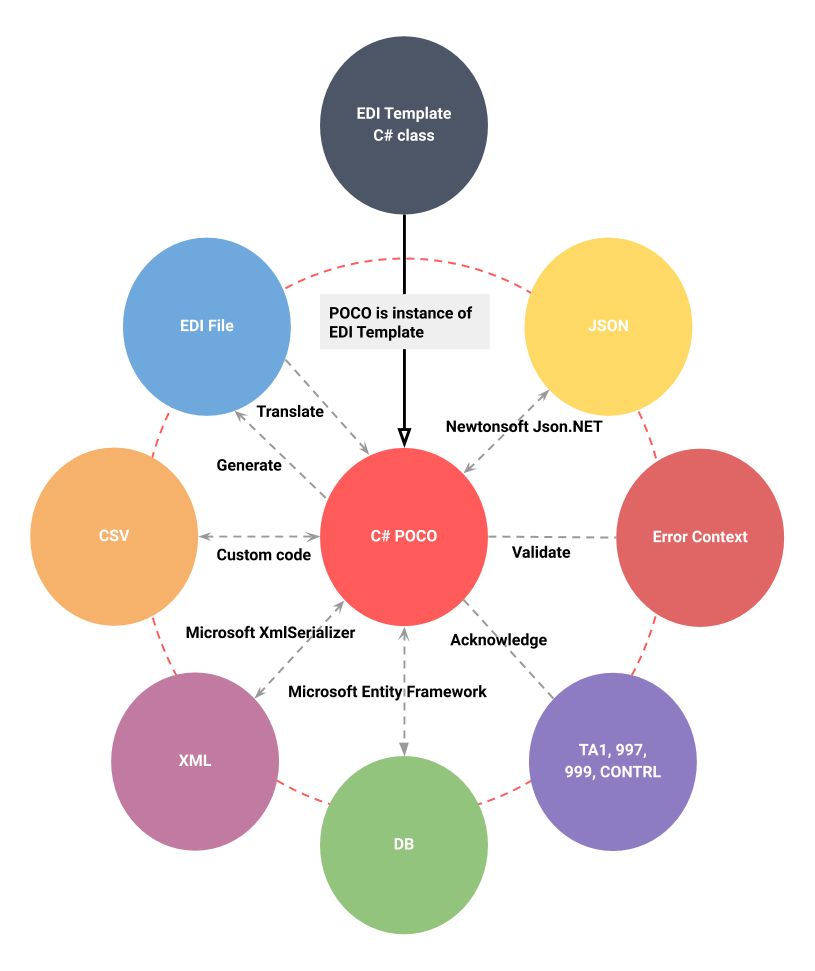
The quickest method of converting between JSON text and a .NET object is using the JsonSerializer. All EDI templates are marked for JSON serialization, e.g. all classes and properties are annotated with the [Serializable()] attribute.
How to serialize EDI to JSON
This example uses Newtonsoft's Json.Net. The destination JSON structure matches that of the EDI template and expected by the serializer. Read this article to learn How to configure the serialization behavior from Microsoft MSDN.
Read from EDI
//  Read EDI file
List ediItems;
using (var ediReader = new X12Reader(ediStream, factory))
    ediItems = ediReader.ReadToEnd().ToList();

//  Pull all EDI objects
var transactions = ediItems.OfType<TS850>();

//  Serialize each EDI object to JSON
foreach (var transaction in transactions)
    var json = Newtonsoft.Json.JsonConvert.SerializeObject(transaction);
Write to EDI
var transaction = new TS850();
//	Populate the transaction and serialize it to JSON
var json = Newtonsoft.Json.JsonConvert.SerializeObject(transaction);
Examples in GitHub:
How to deserialize EDI from JSON
This example uses Newtonsoft's Json.Net. In order to create an EDI POCO from JSON, your JSON must match the structure expected by the serializer. Read this article to learn How to configure the serialization behavior from Microsoft MSDN.
//  Read JSON string
var ediJson = File.OpenRead(@"C:\PurchaseOrder.json").LoadToString();

//  Deserialize to EDI object
var transaction = Newtonsoft.Json.JsonConvert.DeserializeObject<TS850>(ediJson);
Examples in GitHub:
Sample JSON String
The JSON produced by serialization with Newtonsoft's Json.Net looks like this:
{
	"ST": {
		"TransactionSetIdentifierCode_01": "850",
		"TransactionSetControlNumber_02": "0001"
	},
	"BEG": {
		"TransactionSetPurposeCode_01": "00",
		"PurchaseOrderTypeCode_02": "SA",
		"PurchaseOrderNumber_03": "XX-1234",
		"Date_05": "20170301",
		"AcknowledgmentType_07": "NA"
	},
	"PER": [{
		"ContactFunctionCode_01": "BD",
		"Name_02": "ED SMITH",
		"CommunicationNumberQualifier_03": "TE",
		"CommunicationNumber_04": "8001234567"
	}],
	"TAX": [{
		"TaxIdentificationNumber_01": "53247765",
		"LocationQualifier_02": "SP",
		"LocationIdentifier_03": "CA",
		"TaxExemptCode_12": "9"
	}],
	"N1Loop": [{
		"N1": {
			"EntityIdentifierCode_01": "BY",
			"Name_02": "ABC AEROSPACE",
			"IdentificationCodeQualifier_03": "9",
			"IdentificationCode_04": "1234567890101"
		},
		"N2": [{
			"Name_01": "AIRCRAFT DIVISION"
		}],
		"N3": [{
			"AddressInformation_01": "2000 JET BLVD"
		}],
		"N4": [{
			"CityName_01": "FIGHTER TOWN",
			"StateorProvinceCode_02": "CA",
			"PostalCode_03": "98898"
		}]
	}]
	"PO1Loop": [{
		"PO1": {
			"AssignedIdentification_01": "1",
			"QuantityOrdered_02": "25",
			"UnitorBasisforMeasurementCode_03": "EA",
			"UnitPrice_04": "36",
			"BasisofUnitPriceCode_05": "PE",
			"ProductServiceIDQualifier_06": "MG",
			"ProductServiceID_07": "XYZ-1234"
		},
		"MEA": [{
			"MeasurementReferenceIDCode_01": "WT",
			"MeasurementQualifier_02": "WT",
			"MeasurementValue_03": "10",
			"CompositeUnitofMeasure_04": {
				"UnitorBasisforMeasurementCode_01": "OZ"
			}
		}],
		"IT8": {
			"ProductServiceSubstitutionCode_07": "B0"
		},
		"SCHLoop": [{
			"SCH": {
				"Quantity_01": "25",
				"UnitorBasisforMeasurementCode_02": "EA",
				"DateTimeQualifier_05": "106",
				"Date_06": "20170615"
			}
		}]
	}],
	"CTTLoop": {
		"CTT": {
			"NumberofLineItems_01": "1"
		},
		"AMT": {
			"AmountQualifierCode_01": "TT",
			"MonetaryAmount_02": "900"
		}
	},
	"SE": {
		"NumberofIncludedSegments_01": "15",
		"TransactionSetControlNumber_02": "0001"
	},
	"Name": "850",
	"Version": "004010",
	"Format": "X12",
	"PartsCount": 0,
	"IsPart": false,
	"SplitPostion": 0,
	"HasErrors": false,
	"ErrorContext": {
		"Name": "850",
		"ControlNumber": "0001",
		"Version": "004010",
		"Codes": [],
		"Errors": [],
		"HasErrors": false
	}
}