
Validate EDI with templates Last updated: 2026-10-01
How to validate EDI transactions with EDI templates?
It is essential that valid documents are exchanged between trading partners. Accuracy is one of the benefits that EDI provides over paper document processing, and estimates suggest that providing accurate data results in 30% faster delivery time.
EDI tools for .NET allows you to quickly establish if a message is valid or not, and provides you with the exact position and reason for any inaccuracies. To determine this, it uses our custom validation attributes to check for mandatory items, too many or too few repetitions, the correct length, data type or EDI code of a data element, etc.
Internally, validating an EDI transaction with ediFabric .NET is a three-step process:
- Apply validation attributes in the EDI template.
- Validate a .NET object that represents an EDI transaction by calling the IsValid() method
- Report all issues in a collection with details for the position and the reason for the error.
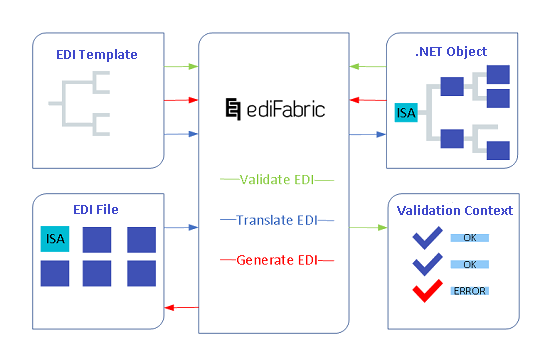
The green path below depicts the validation of an EDI transaction:
- An EDI POCO (.NET object that represents an EDI transaction)
- Is processed through an EDI validator (EdiFabric)
- To produce a Validation Context, e.g. a collection of errors, their positions, and reasons for failure
EDI template validation attributes
EDI templates are essentially .NET models, as in MVC (model-view-controller). In the same way, as .NET models are being validated using System.ComponentModel.DataAnnotations namespace, EDI templates offer a set of validation attributes and an IsValid() method that validates the model (or the .NET object that represents the EDI transaction).
Note
New attributes can be created by inheriting from ValidationAttribute base class.
When multiple attributes are combined on the same class property, validation is executed according to the attribute's validation order.
The following attributes are used to enable validation.
Usage
[Required]
 [Pos(2)]
 public BIG BIG { get; set; }
Validation Order: 1
All Mandatory items are annotated with RequiredAttribute. This attribute can be applied to any property. Items that are not annotated are considered to be Optional.
Repetitions
 [ListCount(100)]
 [Pos(3)]
 public List<NTE> NTE { get; set; }
Validation Order: 2
To control the number of repetitions annotate repeated items with ListCountAttribute. The first parameter is the upper limit of how many items are allowed in the list. You can also set the minimum limit if needed by using the constructor with two parameters. This attribute should only be applied to properties of generic type List<> otherwise it will be discarded.
Length of data element
 [StringLength(1, 10)]
 [Pos(1)]
 public string NumberofIncludedSegments_01 { get; set; }
Validation Order: 3
To control the length of data elements annotate them with StringLengthAttribute. The first parameter is the lower limit of the string length. The second parameter is the upper limit of the string length. This attribute should only be applied to properties of type string; otherwise, it will be discarded.
Type of data element
 [DataElement("96", typeof(X12_AN))]
 [Pos(1)]
 public string NumberofIncludedSegments_01 { get; set; }
Validation Order: 4
To set the data type of data elements annotate them with DataElementAttribute. The first parameter is the EDI identifier of the data element. The second parameter is the type of the data element. This attribute should only be applied to properties of type string; otherwise, it will be discarded. If the referred type is annotated with EdiCodesAttribute, the data element value will be validated against the list of allowed EDI codes. X12 data elements and EDIFACT data elements list each type, the syntax sets, and envelope validation.
Sequence counter
[SeqCount]
 [Pos(1)]
 public LX_HeaderNumber LX_ServiceLineNumber { get; set; }
Validation Order: 10
Check that the value at the specified position in each item in the containing list is correct. For example, in LX loops, checks that the values in the first data element, are 1, 2, 3, etc., matching them to the index of the repeating LX.
EDI template conditional attributes
Certain scenarios require cross-segment or cross-field validation. For example in an address, the postcode is considered valid only when the city is also supplied. A data element's usage can depend on the occurrence of other data elements.
The conditional attributes are used in conjunction with all other validation attributes and are executed in accordance with the general validation order.
Note
Conditional attributes can be used for HIPAA SNIP Type 4 validation and cover the Syntax Notes rules for HIPAA 5010.
The following attributes are used to enable conditional validation and can be applied to any data element property.
Conditional
 [Conditional(5)]
 [StringLength(1, 18)]
 [DataElement("782", typeof(X12_R))]
 [Pos(6)]
 public string AdjustmentAmount_06 { get; set; }
Validation Order: 8
If the annotated EDI data element is not null then all elements at the specified positions must also be not null.
Example: In N4 segment CountrySubdivisionCode_07 can only exist if CountryCode_04 exists.
ConditionalAny
 [ConditionalAny(6, 7)]
 [StringLength(1, 5)]
 [DataElement("1034", typeof(X12_ID))]
 [Pos(5)]
 public string AdjustmentReasonCode_05 { get; set; }
Validation Order: 9
If the annotated EDI data element is not null then at least one of the EDI data elements at the specified positions must also be not null. The attribute is applied to only one of the EDI data elements included in the condition.
Example: In MEA segment if RangeMinimum_05 exist then either CompositeUnitofMeasure_04 or IndustryCode_12 must exist.
Exclusion
 [Exclusion(7)]
 [StringLength(2, 2)]
 [DataElement("156", typeof(X12_ID))]
 [Pos(2)]
 public string AmbulanceDropoffStateorProvinceCode_02 { get; set; }
Validation Order: 6
Only one of the EDI data elements at the specified positions and the annotated data element altogether must be not null.
Example: In N4 segment either AmbulanceDropoffStateorProvinceCode_02 or CountrySubdivisionCode_07 can exist but not both.
Paired
 [Paired(9)]
 [DataElement("66", typeof(X12_ID_66_3))]
 [Pos(8)]
 public string IdentificationCodeQualifier_08 { get; set; }
Validation Order: 5
If any of the elements at the specified positions or the annotated element is not null, then all the elements at the specified positions and the annotated element must be not null. It is applied to only one of all the paired items.
Example: In NM1 segment IdentificationCodeQualifier_08 is paired with IdentificationCode_09, e.g, if one of them exists then the other, must also exist.
RequiredAny
 [RequiredAny(3)]
 [StringLength(1, 50)]
 [DataElement("127", typeof(X12_AN))]
 [Pos(2)]
 public string ReferringProviderSecondaryIdentifier_02 { get; set; }
Validation Order: 7
At least one of the elements at the specified positions or the annotated element must be not null.
Example: In REF segment either ReferringProviderSecondaryIdentifier_02 or Description_03 must be provided.
RequiredIf
 [RequiredIf(1, ",B,C,G,J,Y,")]
 [DataElement("782", typeof(X12_R))]
 [Pos(7)]
 public string BenefitAmount_07 { get; set; }
Validation Order: 8
When the element at the specified position is equal to one of the specified codes, then the annotated element must be not null.
In EB segment, BenefitAmount_07 is required when EligibilityorBenefitInformation_01 (the element at position 1) is "B,C,G,J, or Y".
ExclusionIf
 [ExclusionIf(1, ",A,")]
 [DataElement("782", typeof(X12_R))]
 [Pos(7)]
 public string BenefitAmount_07 { get; set; }
Validation Order: 9
When the element at the specified position is equal to one of the specified codes, then the annotated element must be null.
In EB segment, BenefitAmount_07 must not be used when EligibilityorBenefitInformation_01 (the element at position 1) is "A".
NotUsed
 [NotUsed]
 [DataElement("1038", typeof(X12_AN))]
 [Pos(6)]
 public string NamePrefix_06 { get; set; }
Validation Order: 11
When a "Not Used" data element's value is not null, it is marked as a validation error.
In NM1 segment, NamePrefix_06 must not be used at all. If it is populated, validation should fail with either I10 or I13 error code.
Executing the EDI validation
To validate a .NET object that represents an EDI transaction, call the IsValid() method of EdiMessage, the base class for all EDI templates.
Internally, IsValid iterates through all items in the EDI transaction, e.g. all loops, segments, and elements, and matches them to the validation attributes configured in the EDI template.
In addition to the validation attributes, IsValid matches the reference number in the header and the trailer and checks the segment/message count in the trailers. Validation is usually executed when:
- An EDI file is received from a trading partner, to ensure that only compliant EDI transactions are processed downstream.
- An EDI file is about to be sent out to a trading partner, to ensure that the contents of the file are compliant with that partner's specification.
Note
EDI trailers such as IEA, UNZ, etc. are automatically applied when POCOs are written out to an EDI file using EDI Writer, hence, the EDI trailer might have not been populated at the time IsValid is executed. To tell IsValid that this is the case, set SkipTrailerValidation to true. Every property is listed under Common EDI validation settings.
X12
 var ediStream = File.OpenRead(@"C:\edi.txt");
 List<IEdiItem> ediItems;
 using(var reader = new X12Reader(ediStream, "EdiFabric.Templates.X12"))
    ediItems = reader.ReadToEnd().ToList();

 var purchaseOrders = ediItems.OfType<TS850>();

 foreach (var purchaseOrder in purchaseOrders)
 {
    //  Validate
    MessageErrorContext errorContext;
    if (!purchaseOrder.IsValid(out errorContext))
    {
        //  Report it back to the sender, log, etc.
        var errors = errorContext.Flatten();
    }
    else
    {
        //  purchaseOrder is valid, handle it downstream
    }
 }
EDIFACT
var ediStream = File.OpenRead(@"C:\edi.txt");
 List<IEdiItem> ediItems;
using (var reader = new EdifactReader(ediStream, "EdiFabric.Templates.Edifact"))
	ediItems = reader.ReadToEnd().ToList();

var purchaseOrders = ediItems.OfType<TSORDERS>();

foreach (var purchaseOrder in purchaseOrders)
{
	//  Validate using EDI codes map
	MessageErrorContext errorContext;
	if (!purchaseOrder.IsValid(out errorContext))
	{
		//  Report it back to the sender, log, etc.
		var errors = errorContext.Flatten();
	}
	else
	{
		//  purchaseOrder is valid, handle it downstream
	}
}
HL7
var hl7Stream = File.OpenRead(@"C:\hl7.txt");

List<IEdiItem> hl7Items;
using (var reader = new Hl7Reader(hl7Stream, "EdiFabric.Templates.Hl7"))
	hl7Items = reader.ReadToEnd().ToList();

var dispenses = hl7Items.OfTypeList<TSRDSO13>();

foreach (var dispense in dispenses)
{
	//  Validate
	MessageErrorContext errorContext;
	if (!dispense.IsValid(out errorContext))
	{
		//  Report it back to the sender, log, etc.
		var errors = errorContext.Flatten();
	}
	else
	{
		//  dispense is valid, handle it downstream
	}
}
NCPDP
Stream ncpdpStream = File.OpenRead(@"C:\telco.txt");

List<IEdiItem> ncpdpItems;
using (var ncpdpReader = new NcpdpTelcoReader(ncpdpStream, "EdiFabric.Templates.Ncpdp"))
	ncpdpItems = ncpdpReader.ReadToEnd().ToList();

var claims = ncpdpItems.OfType<TSB1>();

foreach (var claim in claims)
{
	//  Validate
	MessageErrorContext errorContext;
	if (!claim.IsValid(out errorContext))
	{
		//  Report it back to the sender, log, etc.
		var errors = errorContext.Flatten();
	}
	else
	{
		//  claim is valid, handle it downstream
	}
}
SCRIPT
Stream ncpdpStream = File.OpenRead(@"C:\script.txt");

List<IEdiItem> ncpdpItems;
using (var ncpdpReader = new NcpdpScriptReader(ncpdpStream, "EdiFabric.Templates.Ncpdp"))
	ncpdpItems = ncpdpReader.ReadToEnd().ToList();

var prescriptionRequests = ncpdpItems.OfType<TSNEWRX>();

foreach (var prescriptionRequest in prescriptionRequests)
{
	//  Validate
	MessageErrorContext errorContext;
	if (!prescriptionRequest.IsValid(out errorContext))
	{
		//  Report it back to the sender, log, etc.
		var errors = errorContext.Flatten();
	}
	else
	{
		//  prescription request is valid, handle it downstream
	}
}
Examples in GitHub:
- Validate X12 transaction example
- Validate X12 transaction example - async
- Validate EDIFACT transaction example
- Validate EDIFACT transaction example - async
- Validate HL7 transaction example
- Validate HL7 transaction example - async
- Validate NCPDP Telco transaction example
- Validate NCPDP Telco transaction example - async
- Validate NCPDP SCRIPT transaction example
- Validate NCPDP SCRIPT transaction example - async
The validation result
All validation errors are reported back in the form of a MessageErrorContext with detailed information for the position of the fault within the original EDI document, and the reason for the validation failure. IsValid returns true when no errors were found, and returns false when errors were found.
Note
MessageErrorContext is the object returned as an out parameter of the IsValid() method only when there are any errors, otherwise, it is null.
MessageErrorContext is the root object and maintains a collection of SegmentErrorContext, one for each segment with errors. SegmentErrorContext maintains a collection of DataElementErrorContext, one for each data element in that segment, that failed validation.
Note
The architecture of the error contexts allows EdiFabric's AckMan to generate fully compliant EDI acknowledgments with the correct error codes.
Message error context
The MessageErrorContext contains the following details:
- The transaction type, version, and control number of the validated object
- The Codes collection containing any structural message level errors
- The HasErrors property, which checks if either the Codes or the Errors have any items
- The Errors collection containing all segment-specific issues (SegmentErrorContext) Should at least an item exist in this collection, MessageErrorCode.MessageWithErrors is added to the Codes collection
- EDI message error codes
Segment error context
The SegmentErrorContext is a container for all the issues found in a segment and has the following identification properties;
- Name, this is the segment tag, e.g. BIG or DTM
- Value, this is the actual value of the segment from the original EDI document
- SpecType, holds the type of the segment in the EDI template
- Position, this is the position of the segment within its transaction, starting from ST or UNH which are at position 0
These properties should be sufficient to identify the whereabouts of any invalid segment in the original EDI document and to point to the corresponding class in the EDI template.
A SegmentErrorContext can contain multiple validation issues, for multiple data elements with errors for example. All the issues are listed under:
- The Codes collection containing the segment-specific error codes
- The Errors collection containing all data element-specific issues (DataElementErrorContext)
- EDI segment error codes
DataElement error context
The DataElementErrorContext is a container for all the issues found for a particular data element and has the following identification properties:
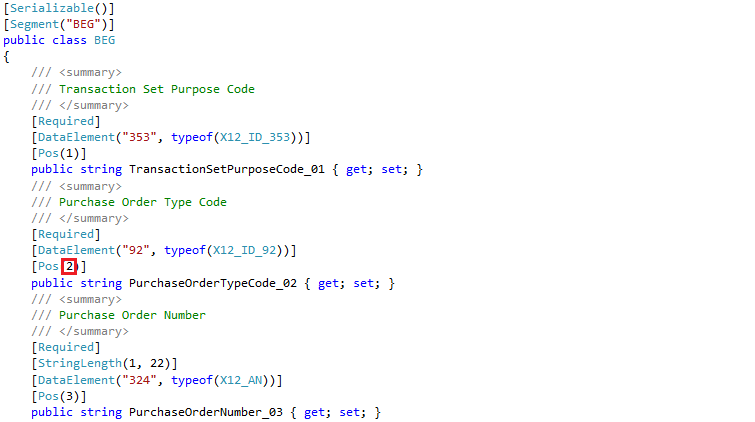
-
Name, this is either the code defined the complex data element:

or the code defined for the simple data element:

- Value, this is the actual value of the data element from the original EDI document
-
Position, this is the position of the complex or simple data element within the segment
-
ComponentPosition is the position of the simple data element within the complex element. If the data element is part of a segment only, this is 0.
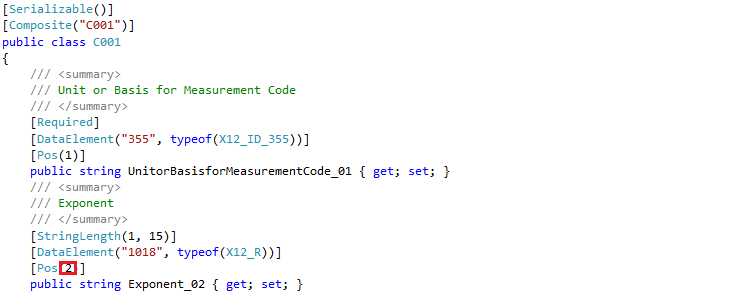
-
RepetitionPosition, this is the position of the composite or simple repeating data element within the List

These properties should be sufficient to identify the data elements that are invalid.
The last property of the DataElementErrorContext is Code which points to the exact data element error code.
- EDI data element error codes
User-friendly error messages
The MessageErrorContext provides a Flatten method that lists all the errors in a single table, such as:
[BGM at pos 3] [4345 at pos 6 with value 123456789ABC] DataElementTooLongCustom error messages are possible by creating custom attributes (inherited from any of the validation attributes) or applying custom validation.
How to extend EDI validation
There are two options to extend the validation in IsValid():
- By creating a custom validation attribute, inheriting from the base ValidationAttribute
- By implementing IEdiValidator
The inbuilt validation process will always invoke the validation of any attribute inheriting from ValidationAttribute whilst iterating through the items of the EDI transaction. It will then invoke any custom validation for any item implementing IEdiValidator.
- ValidationAttribute Reference
- IEdiValidator Reference
- ValidationContext Reference
- InstanceContext Reference
Create custom validation attribute
Add custom validation code in the ValidateEdi method of IEdiValidator. The ValidationContext class contains the InstanceContext object, which holds the current object, its PropertyInfo, and its parent InstanceContext.
All indexes are relative to the current instance.
X12
Create a new validation attribute
[AttributeUsage(AttributeTargets.Property)]
public class N1LoopValidationAttribute : ValidationAttribute
{
    public N1LoopValidationAttribute() : base(10)
    {
    }

    public override SegmentErrorContext ValidateEdi(ValidationContext validationContext)
    {
	var position = validationContext.SegmentIndex + 1;

	var n1Loops = validationContext.InstanceContext.Instance as IList<Loop_N1_850>;
	if (n1Loops != null)
	{
	    foreach (var n1Loop in n1Loops)
	    {
		//  Check if N1 exists and N2 also exist
		if (n1Loop.N1 != null && n1Loop.N2 == null)
			return new SegmentErrorContext("N2", validationContext.SegmentIndex + 2, null, GetType().GetTypeInfo(), SegmentErrorCode.RequiredSegmentMissing,
				"N2 segment is missing.");

		return null;
	    }
	}

	return null;
    }
}
Apply the new validation attribute
[Message("X12", "004010", "850")]
public class TS850CustomValidation : TS850
{
    [N1LoopValidation]
    [DataMember]
    [ListCount(200)]
    [Pos(34)]
    public new List<Loop_N1_850> N1Loop { get; set; }
}
EDIFACT
Create a new validation attribute
[AttributeUsage(AttributeTargets.Property)]
public class LinLoopValidationAttribute : ValidationAttribute
{
    public LinLoopValidationAttribute() : base(10)
    {
    }

    public override SegmentErrorContext ValidateEdi(ValidationContext validationContext)
    {
	var position = validationContext.SegmentIndex + 1;

	var linLoops = validationContext.InstanceContext.Instance as IList<Loop_LIN_ORDERS>;
	if (linLoops != null)
	{
	    foreach (var linLoop in linLoops)
	    {
		//  Count all existing segments before the one that is validated to apply the correct index
		if (linLoop.PIA != null)
			position += linLoop.PIA.Count;
		if (linLoop.IMD != null)
			position += linLoop.IMD.Count;
		if (linLoop.MEA != null)
			position += linLoop.MEA.Count;
		if (linLoop.QTY != null)
			position += linLoop.QTY.Count;
		if (linLoop.PCD != null)
			position += linLoop.PCD.Count;
		if (linLoop.ALI != null)
			position += linLoop.ALI.Count;

		//  Check if QTY exists and DTM also exist
		if (linLoop.QTY != null && linLoop.DTM == null)
			return new SegmentErrorContext("DTM", position + 1, null,  GetType().GetTypeInfo(), SegmentErrorCode.RequiredSegmentMissing,
				"DTM segment is missing.");
	    }
	}

		return null;
    }
}
Apply the new validation attribute
[Message("EDIFACT", "D96A", "ORDERS")]
public class TSORDERSCustomValidation : TSORDERS
{
    [LinLoopValidation]
    [DataMember]
    [ListCount(200000)]
    [Pos(21)]
    public new List<Loop_LIN_ORDERS> LINLoop { get; set; }
}
Examples in GitHub:
- Custom X12 validation
- Custom EDIFACT validation
- Custom HL7 validation
- Custom NCPDP Telco validation
- Custom NCPDP SCRIPT validation
Implement IEdiValidator
Implement IEdiValidator for any EDI loop, EDI segment, or EDI complex element, and add the situational validation logic in the ValidateEdi() method. This ensures that the logic will be executed as part of both IsValid() and AckMan.
 public partial class Loop_2000A : IEdiValidator
 {
    public List<SegmentErrorContext> ValidateEdi(ValidationContext validationContext)
    {
        // Custom validation goes here, example below
        var result = new List<SegmentErrorContext>();

        if (N1 != null && N2 == null)
            result.Add(new SegmentErrorContext("N2",
                validationContext.SegmentIndex + 2, GetType().GetTypeInfo(),
                SegmentErrorCode.RequiredSegmentMissing,
                "N2 segment is missing."));

        return result;
    }
 }
Common EDI validation settings
Note
A ValidationSettings object can be passed to the IsValid() method of EdiMessage to control how EDI transactions are being validated. ValidationSettings Reference
- ComponentDataElement - To exclude a separator when validating alpha-numeric AN-type elements.
- SkipTrailerValidation - Whether to skip trailer validation in messages ('false' by default). This is useful when building a new EDI message, and you haven't created the trailer segments, such as SE or UNZ, because the EdiWriter will automatically append them. This flag tells the validator to skip over any validation that includes message trailer segments.
- DecimalPoint - The decimal point for EDIFACT only ('.' by default).
- SyntaxSet - The syntax set used to validate alphanumeric data types (not set by default). Read about EDIFACT data element validation and X12 data element validation for additional information.
- DataElementTypeMap - Allows you to apply different sets of EDI Codes than the ones in the EDI Template.
- DataElementCodesMap - Allows you to import external EDI codes at runtime.
- DateFormat - This option overrides the date format on the template for all elements with a DT type. It must be a valid C# DateTime format.
- DisableHLSegmentSequenceValidation - Whether to disable the validating if HL segments have sequential IDs starting from 1. This needs DisableHLSegmentValidation to be false before it takes effect.
- DisableHLSegmentValidation - Whether to validate HL segments. This includes parent-child relationships, sequential segments, and correct parent references.
- SkipSeqCountValidation - Whether to skip seq count validation in LX/ENT segments ('false' by default). This validation is enabled by the SeqCount attribute applied in the templates.
- TimeFormat - This option overrides the time format on the template for all elements with a TM type. It must be a valid C# TimeSpan. ParseExact format.
-
ValidationLevel - The validation level. Modeled after HIPAA SNIP levels. Each level includes validating all previous levels in ascending order from 1. By default, this is set to LimitsAndCodes_SNIP2. For more information, read the How to validate HIPAA SNIP levels article. The options are:
- SyntaxOnly_SNIP1
- LimitsAndCodes_SNIP2
- Balancing_SNIP3
- InterSegment_SNIP4
Apply validation settings to IsValid
ValidationSettings settings = new ValidationSettings();
settings.SkipTrailerValidation= true;
settings.DecimalPoint = '.';
settings.SyntaxSet = new Basic();
settings.DataElementTypeMap = new Dictionary<Type, Type>();
settings.DataElementCodesMap = new public Dictionary<string, List<string>>();

ediMessage.IsValid(out errorContext, settings);
What is SyntaxSet?
EDI data element data types such as alpha and alphanumeric are not validated by default. You need to explicitly enable this type of validation that checks if the value of data elements matches the list of allowed characters.
EDI code sets
[EdiCodes(",00,18,19,")]
 public class X12_ID_353
EDI code sets are represented as classes marked with the EdiCodesAttribute. The only parameter is a string containing all of the allowed EDI codes, delimited with a comma.
What is DataElementCodesMap?
Let's illustrate this for Transaction Set Purpose Code, represented by the X12_ID_353 class in the X12 EDI template in version 4010, however, the principle is the same for any EDI code set.
The standard X12_ID_353 code set is defined as allowing the following values: 00, 18, and 19.
///
/// Transaction Set Purpose Code
///
[Serializable()]
[DataContract()]
[EdiCodes(",00,18,19,")]
 public class X12_ID_353
Let's assume that a fictional partner A requires a custom set of EDI codes for X12_ID_35, instead of the standard ones, which only allows the following values: 00, PA, and PB.
The templates using this class can be changed to use a new class, for partner A, however, the validation can be configured without any changes to the existing EDI template. The new values can be configured as a DataElementCodesMap in the ValidationSettings. This way IsValid() will match the new values instead of the standard values.
var codeSetMap = new Dictionary<string, List<string>>();
codeSetMap.Add("X12_ID_353", new List<string> { "00", "PA", "PB" });

ediMessage.IsValid(out errorContext,
     new ValidationSettings { DataElementCodesMap = codeSetMap });
Note
Use this method to dynamically load external code sets from a file, database, or another configuration source. No redeployment is required and the correct value resolution (by the code set class name) occurs at runtime.
Examples in GitHub:
What is DataElementTypeMap?
Similar to the DataElementCodesMap, DataElementTypeMap allows you to validate EDI codes without having to change the whole EDI template, but only the code sets' portion of it. If we continue the example for partner A and X12_ID_353 from the previous sections, a new code set class will need to be created for the values expected by partner A, let's name it X12_ID_353_PartnerA:
///
/// Transaction Set Purpose Code
///
[Serializable()]
[DataContract()]
[EdiCodes(",00,PA,PB,")]
public class X12_ID_353_PartnerA
{
}
Then configure a DataElementTypeMap, which tells the validation to use the new code set class instead of the original one.
Dictionary<Type, Type> codeSetMap = new Dictionary<Type, Type>();
codeSetMap.Add(typeof(X12_ID_353), typeof(X12_ID_353_PartnerA));

ediMessage.IsValid(out errorContext,
     new ValidationSettings { DataElementTypeMap = codeSetMap });
Note
Use this method to statically load external code at design time. Redeployment is required and the correct code class resolution (by the code set type) occurs at runtime.
X12 data elements
All data elements in the EDI templates are represented as System.String. This allows the underlying type to be conveniently discarded during parsing or generation, and to practically read/write any text data, regardless.
Being type-agnostic, ediFabric .NET is able to easily recover corrupt files, broken data, or incorrectly set encoding. Data and type validation is pushed to a follow-up operation such as calling the IsValid() method on the POCO.
DataElement attribute and EdiCodes attribute
ediFabric .NET validates the type of data elements using the type configured on the DataElement attribute.
 [DataElement("96", typeof(X12_AN))]
 [Pos(1)]
 public string NumberofIncludedSegments_01 { get; set; }
The first parameter is the EDI identifier of the data element. The second parameter is the type of the data element.
Validation order for DataElementAttribute is under Type of data element. Code classes are under EDI code sets.
ediFabric .NET supports the following data element types for the X12 standard:
- X12_N - for numeric values
- X12_R - for decimal values
- X12_AN - for alphanumeric values
- X12_DT - for date values
- X12_TM- for time values
- X12_ID - for code sets
If the data type is annotated with EdiCodesAttribute, the data element value will be validated against the list of specified EDI codes.
 [DataElement("96", typeof(X12_ID_1006))]
 [Pos(1)]
 public string AccountDescriptionCode_10 { get; set; }
EDI code type X12_ID_1006 is defined as:
[EdiCodes(",1,10,11,2,5,6,7,8,9,")]
public class X12_ID_1006
{
}Note
EdiCodes supports partition codes, as defined by the SEF format.
List of X12 data types
Numeric - N, N0, N1, N2, N3, N4, N5, N6
Data element can include digits only.
Numeric data with implied decimal. If the decimal part is included, n shows the number of digits to the right of the implied decimal.
Leading zeros are suppressed unless needed to satisfy the minimum length of the element. If the value is negative, include a minus sign, which does not count toward the length.)
N and N0 are equivalent (it is not necessary to include the zero). This means the implied decimal is at the end of the number.
N1 means there is one digit to the right of the implied decimal. Example: The element contains the value -123, which is to be interpreted as -12.3.
N2 means there are two digits to the right of the implied decimal. Example: The element contains the value -123, which is to be interpreted as -1.23.
The DOM C# class representing numeric X12 data type is:
 [Serializable()]
 public class X12_N0
 {
 }
Decimal - R
Data element can include decimal point and digits only. Decimal point is optional for integers.
The number after R shows the maximum number of digits to the right of the decimal. R0 means there should be no digits to the right of the decimal.
Example: The element contains the value 150.25 and the type is R. The value being represented is also 150.25.
Example: The element contains the value 150.23 but the type is R1. The value being represented would be 150.2
Signs and decimal points do not count toward length.
The DOM C# class representing decimal X12 data type is:
 [Serializable()]
 public class X12_R
 {
 }
Alphanumeric - AN
Data element can include any letters, digits, special characters, and control characters.
X12 notation combines the type and length as in the following examples:
an5 exactly 5 alphanumeric characters
an..5 up to 5 alphanumeric characters.
The DOM C# class representing alphanumeric X12 data type is:
 [Serializable()]
 public class X12_AN
 {
 }
Date - DT
Date, in YYMMDD or CCYYMMDD format. CC is century.
The DOM C# class representing date X12 data type is:
 [Serializable()]
 public class X12_DT
 {
 }
Time - TM
Time, in 24-hour clock time as follows: HHMM or HHMMSS.
The DOM C# class representing time X12 data type is:
 [Serializable()]
 public class X12_TM
 {
 }
How to validate DTP segments
Date, in CCYYMMDD or CCYYMMDD-CCYYMMDD-CCYYMMDD format. CC is century.
When a DTP segment is encountered the validator will validate all data elements with code 1251 only if there is a preceding data element with code 1250 and value D8 or RD8.
How to validate X12 data types
By default, calling IsValid() only validates numeric, DTP (see above), date, and time data types. Alphanumeric data types are not validated. Type validation is global, e.g. all data elements marked with the same type are validated in exactly the same way.
To validate alphanumeric X12 data elements, a SyntaxSet must be configured in the ValidationSettings.
The following syntax set implementations are available:
Basic
Valid characters are:
ABCDEFGHIJKLMNOPQRSTUVWXYZ0123456789!&()*+,-./:;?= '""
 MessageErrorContext result;
 var validationResult = msg.IsValid(out result,
     new ValidationSettings { SyntaxSet = new Basic()});
Extended
Valid characters are:
ABCDEFGHIJKLMNOPQRSTUVWXYZabcdefghijklmnopqrstuvwxyz0123456789!&()*+,-./:;?= '""%@[]_{}\|<>~#$
 MessageErrorContext result;
 var validationResult = msg.IsValid(out result,
     new ValidationSettings { SyntaxSet = new Extended()});
Custom characters
Use CustomSyntax to specify a custom set of chars for all AN data types.
 MessageErrorContext result;
 var validationResult = msg.IsValid(out result,
     new ValidationSettings {
          SyntaxSet = new CustomSyntax(new Basic().GetValidChars() + "ß")});
Regex
Use RegexSyntax to specify a custom regex for all AN data types.
 MessageErrorContext result;
 var validationResult = msg.IsValid(out result,
     new ValidationSettings {
          SyntaxSet = new RegexSyntax(new Regex("[a-zA-Z0-9 ]"))});
Examples in GitHub:
How to override syntax set validation
Sometimes a particular data element needs to be validated slightly differently than the syntax set specified in the ValidationSettings for its type. This can be achieved by overriding the syntax set with a regex expression directly in the DataElement attribute:
[DataElement("956", typeof(X12_AN), @"^[A-Z0-9 a-z,./%]*$")]
[Pos(5)]
public string TaxJurisdictionCode_05 { get; set; }
The overridden data element will always be validated against the regex specified in the DataElement attribute, ignoring the syntax set specified in the ValidationSettings.
How to validate ISA and GS
To validate the control segments ISA and GS call the Validate() method of the ContolSegment class. The X12 control segments are defined in the EdiFabric.Core.Model.Edi.X12 namespace.
It is also possible to override the default validation for ISA and GS by deriving from the ISA and GS classes. The derived classes can define whatever data element attributes are needed and to return the derived control segments whilst reading from an X12 file, the X12ReaderBase constructor must be used, instead of X12Reader.
Examples in GitHub:
It is also possible to configure the ValidationSettings and apply custom EDI codes when only the EDI codes need to be validated differently.
For example, to validate the sender ID ISA06 data element with allowed EDI codes SENDER1 and SENDER2, you can do the following:
var codeSetMap = new Dictionary<string, List<string>>();
codeSetMap.Add("X12_ID_I06", new List<string> { "SENDER1", "SENDER2" });

isa.Validate( new ValidationSettings { DataElementCodesMap = codeSetMap });.
The available ISA and GS EDI codes that can be used for this kind of validation are:
ISA
- ISA01 - X12_ID_I01
- ISA02 - X12_ID_I02
- ISA03 - X12_ID_I03
- ISA04 - X12_ID_I04
- ISA05 - X12_ID_I05
- ISA06 - X12_ID_I06
- ISA07 - X12_ID_I05
- ISA08 - X12_ID_I07
- ISA11 - X12_ID_I65
- ISA12 - X12_ID_I11
- ISA15 - X12_ID_I14
- ISA16 - X12_ID_I15
GS
- GS01 - X12_ID_479
- GS02 - X12_ID_G02
- GS03 - X12_ID_G03
- GS07 - X12_ID_G07
- GS08 - X12_ID_G08
EDIFACT data elements
All data elements in the EDI templates are represented as System.String. This allows the underlying type to be conveniently discarded during parsing or generation, and to practically read/write any text data, regardless.
Being type-agnostic, ediFabric .NET is able to easily recover corrupt files, broken data, or incorrectly set encoding. Data and type validation is pushed to a follow-up operation such as calling the IsValid() method on the POCO.
DataElement attribute and EdiCodes attribute
ediFabric .NET validates the type of data elements using the type configured on the DataElement attribute.
 [DataElement("96", typeof(EDIFACT_AN))]
 [Pos(1)]
 public string NumberofIncludedSegments_01 { get; set; }
The first parameter is the EDI identifier of the data element. The second parameter is the type of the data element.
Validation order for DataElementAttribute is under Type of data element. Code classes are under EDI code sets.
ediFabric .NET supports the following data element types for the EDIFACT standard:
- EDIFACT_N - for numeric values
- EDIFACT_A - for alphabetic values
- EDIFACT_AN - for alphanumeric values
- EDIFACT_DT - for date values (not used)
- EDIFACT_TM - for time values (not used)
- EDIFACT_ID - for code sets
If the data type is annotated with EdiCodesAttribute, the data element value will be validated against the list of specified EDI codes.
 [DataElement("96", typeof(EDIFACT_ID_1049))]
 [Pos(1)]
 public string NumberofIncludedSegments_01 { get; set; }
EDI code type EDIFACT_ID_1049 is defined as:
[EdiCodes(",1,10,11,2,5,6,7,8,9,")]
public class EDIFACT_ID_1049
{
}Note
EdiCodes supports partition codes, as defined by the SEF format.
List of EDIFACT data types
Numeric - N
A data element can include digits and a decimal mark (either point or comma is acceptable for this).
EDIFACT notation combines the type and length as in the following examples:
n..9 up to nine digits
n9 exactly nine digits
If the element has a variable length, omit leading zeros and trailing spaces unless significant. A single zero before a decimal is significant, and a zero may be significant if the element’s specification states that it is.
Signs and decimals don’t count toward maximum field length. The sign must be omitted unless negative.
If the number is fractional, include the decimal mark. If a decimal mark is included in the EDI file, include at least one digit before and after it. Do not include decimals for integers unless needed to indicate precision.
The official representation for the decimal mark is the comma. If a UNA is included, its third character specifies the decimal mark.
The C# class representing numeric EDIFACT data type is:
 [Serializable()]
 public class EDIFACT_N
 {
 }
Alphabetic - A
Data element can include any letters, special characters, and control characters but no digits.
EDIFACT notation combines the type and length as in the following examples:
a3 exactly 3 alphabetic characters.
a..3 up to three alphabetic characters.
The C# class representing alphabetic EDIFACT data type is:
 [Serializable()]
 public class EDIFACT_A
 {
 }
Alphanumeric - AN
Data element can include any letters, digits, special characters, and control characters.
EDIFACT notation combines the type and length as in the following examples:
an5 exactly 5 alphanumeric characters
an..5 up to 5 alphanumeric characters.
The C# class representing alphanumeric EDIFACT data type is:
 [Serializable()]
 public class EDIFACT_AN
 {
 }
How to validate EDIFACT data types
By default, calling IsValid() only validates numeric data types. Alphabetic and alphanumeric data types are not validated. Type validation is global, e.g. all data elements marked with the same type are validated in exactly the same way.
To validate alphabetic and alphanumeric EDIFACT data elements, a SyntaxSet must be configured in the ValidationSettings.
The following syntax set implementations are available:
UNOA
Valid characters are:
ABCDEFGHIJKLMNOPQRSTUVWXYZ0123456789.,–() /=
 MessageErrorContext result;
 var validationResult = msg.IsValid(out result,
     new ValidationSettings { SyntaxSet = new Unoa()});
UNOB
Valid characters are:
ABCDEFGHIJKLMNOPQRSTUVWXYZabcdefghijklmnopqrstuvwxyz0123456789.,–() /=‘+:?!”%&*;<>'""
 MessageErrorContext result;
 var validationResult = msg.IsValid(out result,
     new ValidationSettings { SyntaxSet = new Unob()});
Custom characters
Use CustomSyntax to specify a custom set of chars across all A or AN data types.
 MessageErrorContext result;
 var validationResult = msg.IsValid(out result,
     new ValidationSettings {
          SyntaxSet = new CustomSyntax(new Unoa().GetValidChars() + "ß")});
Regex
Use RegexSyntax to specify a custom regex for all A or AN data types.
 MessageErrorContext result;
 var validationResult = msg.IsValid(out result,
     new ValidationSettings {
          SyntaxSet = new RegexSyntax(new Regex("[a-zA-Z0-9 ]"))});
Examples in GitHub:
How to override syntax set validation
Sometimes a particular data element needs to be validated slightly differently than the syntax set specified in the ValidationSettings for its type. This can be achieved by overriding the syntax set with a regex expression directly in the DataElement attribute:
[DataElement("5286", typeof(EDIFACT_AN), @"^[A-Za-z0-9., %]*$")]
[Pos(4)]
public string Dutyortaxorfeeassessmentbasisvalue_04 { get; set; }
The overridden data element will always be validated against the regex specified in the DataElement attribute, ignoring the syntax set specified in the ValidationSettings.
How to validate UNB and UNG
To validate the control segments UNB and UNG call the Validate() method of the ContolSegment class. The EDIFACT control segments are defined in the EdiFabric.Core.Model.Edi.Edifact namespace.
It is also possible to override the default validation for UNB and UNG by deriving from the UNB and UNG classes. The derived classes can define whatever data element attributes are needed and to return the derived control segments whilst reading from an EDIFACT file, the EdifactReaderBase constructor must be used, instead of EdifactReader.
Examples in GitHub:
How to validate EANCOM EDI codes
Validating EANCOM messages uses the same functionality as that for EDIFACT messages with several assumptions.
All validation attributes across the EANCOM EDI templates define loosely their respective EDI Codes. For example, the EDI Codes for ID 2005 are defined as:
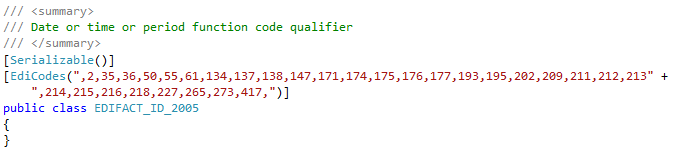
The allowed values for ID 2005 differ across segments and levels, for example, the implementation guide for GS1 INVOIC Syntax 4 states that:
-
For DTM in RFF loop, the allowed codes are
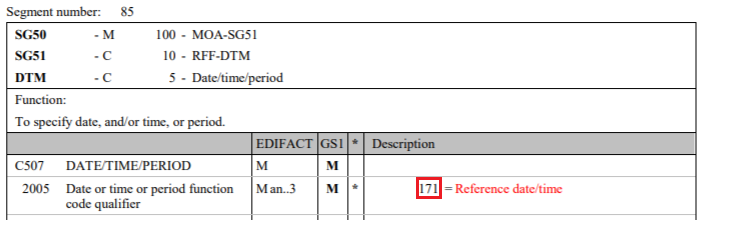
-
For DTM in LOC Loop, the allowed codes are
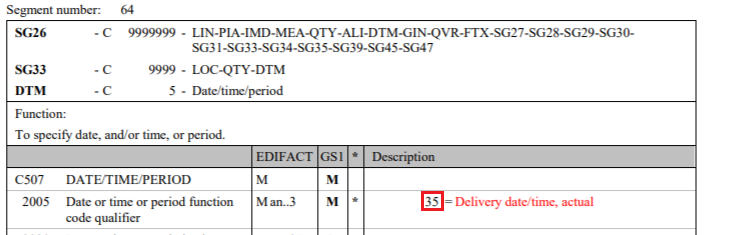
In case a more detailed validation is required, the validation attributes need to be manually configured.