
Convert between EDI and CSV or flat files Last updated: 2023-08-24
Read and write CSV files
This page is for .NET developers who exchange CSV, VDA or other flat files. With ediFabric .NET you can:
- Read the contents of a CSV file into POCOs, which are instances of EDI templates.
- Write the contents of POCOs into CSV or flat files.
Customize EDI guidelines explains how EDI templates represent a model, and the same concepts apply to CSV files.
Before you can read and write CSV files with ediFabric .NET you need to manually create an EDI template that matches the structure of your custom CSV files.
Everything in Parsing flat files and Generating flat files below also applies to CSV files, because CSV is a subset of flat files with delimited lines.
Create an EDI template for a custom CSV file
Let's assume that we have a CSV file that looks like this (including column headers):
LINE_NUMBER,UPC_NUMBER,QUANTITY,PRICE,UOM,PO_NUMBER,PO_DATE,CUSTOMER_NAME,CUSTOMER_NUMBER,ADDRESS,CITY,STATE,POSTAL_CODE
001002003,555666411,10,15,EA,10000234500,20170520,SHIPTO NAME,123456,SHIPTO ADDRESS1,SHIPTOCITY,OH,43200
002003004,555666817,20,20,EA,10000234500,20170520,SHIPTO NAME,123456,SHIPTO ADDRESS1,SHIPTOCITY,OH,43200
003004005,555666908,10,10,EA,10000234500,20170520,SHIPTO NAME,123456,SHIPTO ADDRESS1,SHIPTOCITY,OH,43200
004005006,555666321,10,15,EA,10000234500,20170520,SHIPTO NAME,123456,SHIPTO ADDRESS1,SHIPTOCITY,OH,43200
005006007,555666287,10,20,EA,10000234500,20170520,SHIPTO NAME,123456,SHIPTO ADDRESS1,SHIPTOCITY,OH,43200
006007008,555666413,20,1,EA,10000234500,20170520,SHIPTO NAME,123456,SHIPTO ADDRESS1,SHIPTOCITY,OH,43200
The full example is available in GitHub (Run4 method):
This file can easily be represented by the following EDI template:
using EdiFabric.Core.Annotations.Edi;
using EdiFabric.Core.Annotations.Validation;
using EdiFabric.Core.Model.Edi;
using System;
using System.Collections.Generic;

namespace EdiFabric.Examples.X12.MapEDI
{
    [Serializable()]
    [Message("Flat", "PurchaseOrder")]
    public class PurchaseOrder : EdiMessage
    {
        [Required]
        [Pos(1)]
        public Header Header { get; set; }

        [Required]
        [Pos(2)]
        public List<Item> Items { get; set; }
    }

    [Serializable()]
    [Segment("LINE_NUMBER", '\0')]
    public class Header
    {
        [Required]
        [Pos(1)]
        public string Data { get; set; }
    }

    [Serializable()]
    [Segment("", ',')]
    public class Item
    {
        [Pos(1)]
        public string LineNumber { get; set; }
        [Pos(2)]
        public string UPCNumber { get; set; }
        [Pos(3)]
        public string Quantity { get; set; }
        [Pos(4)]
        public string Price { get; set; }
        [Pos(5)]
        public string UOM { get; set; }
        [Pos(6)]
        public string PONumber { get; set; }
        [Pos(7)]
        public string PODate { get; set; }
        [Pos(8)]
        public string CustomerName { get; set; }
        [Pos(9)]
        public string CustomerNumber { get; set; }
        [Pos(10)]
        public string AddressLine { get; set; }
        [Pos(11)]
        public string City { get; set; }
        [Pos(12)]
        public string State { get; set; }
        [Pos(13)]
        public string PostCode { get; set; }
    }
}
Separate segments are defined for the header and the repeating items. The header has a tag "LINE_NUMBER" to be identified with and no delimiter, e.g. all data will be added to the same field "Data".
The Item segment has no tag, e.g. all lines after the header will be appended to the items list, and defines comma "," as the delimiter. The order of fields needs to match the order in the CSV file.
Read CSV file into an instance of the EDI template
Stream ediStream = File.OpenRead(@"\..\..\..\Files\CSV_PO.txt");
List<IEdiItem> items = new List<IEdiItem>();

using (StreamReader streamReader = new StreamReader(ediStream, Encoding.UTF8, true, 1024))
{
    using (var flatReader = new FlatReader(streamReader, FlatFactory))
    {
        while (flatReader.Read())
        {
	    items.Add(flatReader.Item);
        }
    }
}
private static MessageContext FlatFactory(string segment)
{
var id = segment.Substring(0, 2);
switch (id)
{
case "LI":
return new MessageContext("PurchaseOrder", "Flat", mc => Assembly.Load(new AssemblyName("EdiFabric.Examples.FlatFile.Common")));
}
return null;
}Additional information
Parsing flat files (CSV, VDA) with Flat Reader
Internally, translating a custom file with ediFabric .NET is a two-step process:
- Identify and match each message in the flat file to an EDI template
- For each message, transpose its contents to the matching EDI template
The blue path below depicts the translation of a custom flat file (CSV, VDA, etc.):
- A flat file
- Is processed through a Flat reader (EdiFabric)
- To produce a list of .NET objects which are instances of EDI templates
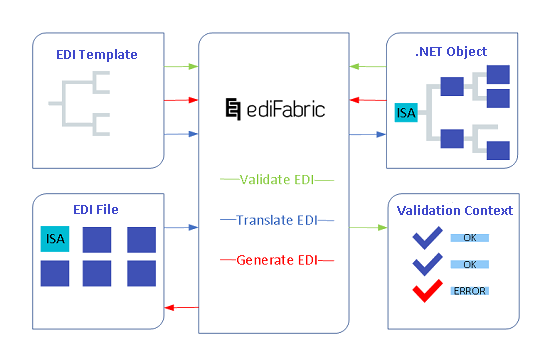
ediFabric .NET translates custom flat files by implementing a DFS (depth-first-search) algorithm. Messages from the flat file are transposed into C# instances of the corresponding EDI template class.
FlatReader provides fast, non-cached, forward-only access to flat file data. FlatReader methods let you move through the messages contained in the flat file.
FlatReader implements IDisposable and should be disposed of either directly or indirectly.
Note
FlatReader can read flat files of any type, such as CSV, VDA, positional (incl. of varying length), delimited (including nested items with secondary delimiter), or a mixture of delimited and positional lines.
Flat file delimiters
FlatReader can only read flat files that contain lines whereby a line is defined as:
A line is defined as a sequence of characters followed by a line feed ("\n"), a carriage return ("\r"), or a carriage return immediately followed by a line feed ("\r\n").
Properties of FlatReader
The properties of the class reflect the value of the current node, which is where the reader is positioned.
- Item property indicates the current message.
Configuration of FlatReader
FlatReader can be configured with the following additional settings:
Common settings
- ContinueOnError - this is to force the parser to continue past an exception. By default, parsing stops when an exception is encountered.
- Split- When a template is marked for splitting it will still be translated as if it had not been marked. To explicitly enable splitting set this to True.
Matching a message to an EDI template
Flat files can contain batches of top-level structures, called messages. For example, in VDA 4905, a flat-file can contain multiple delivery instructions, or a custom purchase order file can contain multiple purchase orders. Each of these different "messages" needs to be represented with an EDI template, to which FlatReader will parse the message.
Before a message could be parsed, the reader needs to identify the EDI template (or the C# class) that corresponds to that message. To do so, the reader must be able to identify that a new message begins by characters at the start of a line.
Let's take a look at the flat-file below. It contains two messages, purchase order and another one which we'll call "markers". The two messages are represented with two different templates:
PO1999-10-20
US        Alice Smith         123 Maple Street    Mill Valley    CA 90952
US        Robert Smith        8 Oak Avenue        Old Town       PA 95819
ITEMS,ITEM872-AA|Lawnmower|1|148.95|Confirm this is electric,ITEM926-AA|Baby Monitor|1|39.98|Confirm this is electric

H,1999-10-20
B,Alice,Smith
CorruptBodyTag,Robert,Smith
B,Robert,Smith,test
T,1999-10-21
The two messages are identified by the following tags:
- Every line that begins with "PO" is the start of a new PO message
- Every line that begins with "H," is the start of a new Markers message
Note
It is up to the creator of the file to ensure that messages can be unambiguously identified and to communicate the exact rules on how to identify each message.
To tell the reader how to resolve each message to the correct template, you create a flat factory that returns a MessageContext object. So, for our two messages above, we can implement the following factory:
private static MessageContext FlatFactory(string segment)
{
    var id = segment.Substring(0, 2);
    switch (id)
    {
        case "PO":
	    return new MessageContext("PO", "Flat", mc => Assembly.Load(new AssemblyName("EdiFabric.Examples.FlatFile.Common")));
	case "H,":
	    return new MessageContext("Markers", "Flat", mc => Assembly.Load(new AssemblyName("EdiFabric.Examples.FlatFile.Common")));
    }

    return null;
}The MessageContext requires three parameters to be able to match a message to an EDI template by using the values from the MessageAttribute specified in the EDI template.
- The name that matches the name in the MessageAttribute
- The standard (usually Flat) that matches the standard in the MessageAttribute
- The assembly where the template class is built into
The template for the PO message is defined as:
[Message("Flat", "PO")]
public class FlatPO : EdiMessage
The template for the Markers message is defined as:
[Message("Flat", "Markers")]
public class FlatMarkers : EdiMessage
The FlatReader searches for a matching C# class through all the classes in the .NET assembly configured in the third parameter.
Reader exceptions and partial parsing
There are two types of failures that the FlatReader can encounter - when the flat file can't be read at all, and when a message can't be parsed to its corresponding EDI template.
Flat file can't be parsed
In the event that the flat file is corrupt and can't be read at all, FlatReader does not throw exceptions but instead returns a ReaderErrorContext. No messages can be matched to EDI templates.
var readerErrors = ediItems.OfType<ReaderErrorContext>();
if (readerErrors.Any())
{
   //  The stream is corrupt. Reject it and report back to the sender
   foreach(var readerError in readerErrors)
   {
       //  Respond with the error context,
       //  which contains the standard EDI error code and fault reason
       var error = readerError.MessageErrorContext.Flatten();
   }
}A message within the flat file can't be parsed
In this case, the message has been matched to an EDI template, however, it can't be parsed to its .NET POCO due to reaching any of these conditions:
- An unrecognizable line (the line can be identified neither by length or tag)
- An improperly positioned line (the line can't be positioned to any item in the template)
- A line that can't be parsed (the line has more fields than specified in the EDI template)
Upon reaching any of the conditions above, the parsing of the flat file stops, and the ErrorContext property of EdiMessage (the base class of every .NET POCO) is populated with the relevant error details, and the HasErrors property of EdiMessage is set to true.
The HasErrors property of EdiMessage indicates if the message was parse without problems (HasErrors = false) or partially parsed (HasErrors = true).
Note
FlatReader supports a Continue-On-Error mode which forces the parser to continue towards the end of the flat file regardless of any errors. To enable it, set the ContinueOnError parameter of the reader settings to true.
Read flat files
FlatReader only has a streaming mode, which needs to be executed in a loop like this:
Stream flatStream = File.OpenRead(@"C:\\Flat_PO.txt");
List<IEdiItem> items = new List<IEdiItem>();

using (StreamReader streamReader = new StreamReader(flatStream, Encoding.UTF8, true, 1024))
{
    using (var flatReader = new FlatReader(streamReader, FlatFactory))
    {
	while (flatReader.Read())
	{
	    items.Add(flatReader.Item);
	}
    }
}
Examples in GitHub:
Guidelines for creating EDI templates
These templates describe flat files. They are still called EDI templates because they work the same way; Customize EDI guidelines explains how EDI templates are built.
FlatReader supports multiple variants of flat files that contain lines defined as positional, delimited, or a mixture of both. This guideline explains how to represent the different types of lines in the EDI template.
How to identify lines?
-
Lines with tags
Lines that can be identified with tags must be defined as a segment with an ID equal to that of the tag, e.g. the following line:
PO2019-12-17that can be identified with the tag PO, should be represented as:
[Segment("PO")] public class Header -
Lines without tags
Lines that can't be identified with tags, must be defined as a segment with an empty ID. These lines must have lines with tags before and after them, e.g. the following line:
US David Pastrnak 100 Legends Way Boston MA 02114which has no flag as the first value can differ (country code), should be represented as:
[Segment("")]
public class Customer
and located between lines with tags:
[Message("Flat", "PO")]
public class FlatPO : EdiMessage
{
	[Required]
	[Pos(1)]
	public Header Header { get; set; }

	[Required]
	[Pos(2)]
	public List<Customer> Customers { get; set; }

	[Required]
	[Pos(3)]
	public Items Items { get; set; }
}
[Segment("H", ',')] public class FlatHeader[Segment("ITEMS", ',', '|')] public class Items
How to represent lines?
-
Positional lines
Positional lines are represented as segments with fields in a specified order, each annotated with [StringLength] attribute where Min and Max are equal.
The following positional line:
US David Pastrnak 100 Legends Way Boston MA 02114can be represented as:
[Segment("")] public class Customer { [Required] [StringLength(10, 10, false, ' ')] [Pos(1)] public string Country { get; set; } [Required] [StringLength(20, 20, false, ' ')] [Pos(2)] public string FullName { get; set; } [Required] [StringLength(20, 20, false, ' ')] [Pos(3)] public string Street { get; set; } [Required] [StringLength(15, 15, false, ' ')] [Pos(4)] public string City { get; set; } [Required] [StringLength(3, 3, false, ' ')] [Pos(5)] public string State { get; set; } [Required] [StringLength(5, 5, false, ' ')] [Pos(6)] public string PostCode { get; set; } } -
Delimited lines
Delimited lines are represented as segments with fields (including composite fields) in a specified order, and field delimiter (and optionally a composite field delimiter):
The following line:
ITEMS,ITEM213-CC|Bauer Nexus 2N Pro|1|168.95|Hockey stick,ITEM323-CC|CCM RibCor 70K|1|500.98|Hockey skatescan be represented as:
[Serializable()] [Segment("ITEMS", ',', '|')] public class Items { [Pos(1)] public string Tag { get; set; } [Pos(2)] public List<ItemDetail> ItemDetails { get; set; } } [Serializable()] [Composite("ItemDetails")] public class ItemDetail { [Pos(1)] public string ProductCode { get; set; } [Pos(2)] public string Description { get; set; } [Pos(3)] public string Quantity { get; set; } [Pos(4)] public string UnitPrice { get; set; } [Pos(5)] public string Notes { get; set; } } -
Unexpected lines
Sometimes it is possible that certain lines can be either corrupt or not expected/not relevant and need to be excluded without breaking the parsing.
The following file has 2 lines starting with "Corrupt" which can appear at random positions in the body. We are only interested in lines that start with "B," in the body, or the header (starting with "H,") and the trailer (starting with "T,"):
H,1999-10-20
B,Alice,Smith
CorruptBodyTag,Robert,Smith
B,Robert,Smith,test
CorruptBodyTag,Jimmy,Smith
B,Robert2,Smith2,test2
T,1999-10-21
To parse this file, define the template as:
using System;
using System.Collections.Generic;
using EdiFabric.Core.Annotations.Edi;
using EdiFabric.Core.Annotations.Validation;
using EdiFabric.Core.Model.Edi;

namespace EdiFabric.Templates.Vda
{
    [Serializable()]
    [Message("Flat", "Corrupt")]
    public class FlatCorrupt : EdiMessage
    {
        [Required]
        [Pos(1)]
        public FlatHeaderCorrupt Header { get; set; }

        [Required]
        [Pos(2)]
        public AllBody Body { get; set; }
    }

    [Serializable()]
    [Segment("H", ',')]
    public class FlatHeaderCorrupt
    {
        [Required]
        [Pos(1)]
        public string Tag { get; set; }

        [Required]
        [Pos(2)]
        public string Date { get; set; }
    }

    [Serializable()]
    [Segment("T", ',')]
    public class FlatTrailerCorrupt
    {
        [Required]
        [Pos(1)]
        public string Tag { get; set; }

        [Required]
        [Pos(2)]
        public string Date { get; set; }
    }

    [Serializable()]
    [All()]
    public class AllBody
    {
        [Pos(1)]
        public List<FlatBodyCorrupt> Body { get; set; }

        [Required]
        [Pos(2)]
        public FlatTrailerCorrupt Trailer { get; set; }

        [Pos(3)]
        public List<InvalidBody> InvalidBody { get; set; }
    }

    [Serializable()]
    [Segment("B", ',')]
    public class FlatBodyCorrupt
    {
        [Required]
        [Pos(1)]
        public string Tag { get; set; }

        [Required]
        [Pos(2)]
        public string Name { get; set; }

        [Required]
        [Pos(3)]
        public string Surname { get; set; }

        [Pos(4)]
        public string Extra { get; set; }
    }

    [Serializable()]
    [Segment("", '\0')]
    public class InvalidBody
    {
        [Required]
        [Pos(1)]
        public string Data { get; set; }
    }
}
To be able to weed out the unwanted lines beginning with "Corrupt", define a separate segment with a single field as:
[Segment("", '\0')]Then include a List<> of that segment as the last segment in an [All()] object:
[All()] public class AllBody { [Pos(1)] public List<FlatBodyCorrupt> Body { get; set; } [Required] [Pos(2)] public FlatTrailerCorrupt Trailer { get; set; } // Last segment [Pos(3)] public List<InvalidBody> InvalidBody { get; set; } } -
Composite lines
Lines can have two levels of nesting, separated by different delimiters.
The following line begins with the tag "ITEMS". The line can contain multiple items delimited with a comma ",". Each item contains multiple sub-items, each delimited by pipe "|".
ITEMS,ITEM213-CC|Bauer Nexus 2N Pro|1|168.95|Hockey stick,ITEM323-CC|CCM RibCor 70K|1|500.98|Hockey skatescan be represented as:
[Serializable()]
[Segment("ITEMS", ',', '|')]
public class Items
{
    [Pos(1)]
    public string Tag { get; set; }

    [Pos(2)]
    public List<ItemDetail> ItemDetails { get; set; }
}

[Serializable()]
[Composite("ItemDetails")]
public class ItemDetail
{
    [Pos(1)]
    public string ProductCode { get; set; }

    [Pos(2)]
    public string Description { get; set; }

    [Pos(3)]
    public string Quantity { get; set; }

    [Pos(4)]
    public string UnitPrice { get; set; }

    [Pos(5)]
    public string Notes { get; set; }
}
Sub-items are represented with the [Composite] attribute.
[Composite("ItemDetails")]
Read VDA files
Although VDA files can be read using FlatReader, there is a legacy VdaReader which can also be used to read VDA files.
VdaReader offers predefined settings for VDA files (reading lines of 128 symbols) and can be used without line breaks, e.g. when all lines are chained one after the other without CR/LN breaks between them.
Stream ediStream = File.OpenRead(@"\..\..\..\Files\Vda_4905_02.txt");
List<IEdiItem> ediItems;
using (var ediReader = new VdaReader(ediStream, MessageContextFactory))
{
    ediItems = ediReader.ReadToEnd().ToList();
}
Examples in GitHub:
Generating flat files (CSV, VDA) with Flat Writer
Generating a flat-file with ediFabric .NET is a three-step process:
- Create an instance of the required EDI template (or C# class), e.g. TS4905 for a VDA delivery instruction.
- Populate that instance with data, usually, this requires custom code to convert either a database/domain object or export from an ERP in CSV, XML, JSON, etc. format, to the EDI template.
- Write the instance to a flat file or a stream using Flat writer.
The red path below depicts the generation of a flat-file:
- A .NET object (instance of its EDI template)
- Is processed through a Flat writer (EdiFabric)
- To produce a flat file
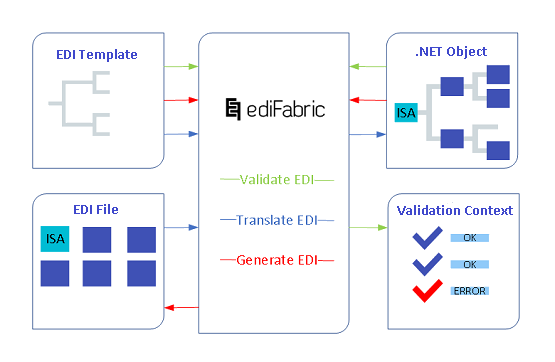
How to create and populate .NET objects
Build EDI files shows how to populate the C# POCOs, and the same steps apply to flat files.
How to write flat objects
The purpose of FlatWriter is to write an already populated C# instance of a particular EDI template, to a text flat file or stream.
FlatWriter provides a fast, non-cached, forward-only way to generate streams or files. It is up to the consumer to preserve the sequence of what is being written.
FlatWriter implements IDisposable and needs to be disposed of. This ensures that all buffered data is properly written and the internal buffer is cleared.
using (var stream = new MemoryStream())
{
    using (var writer = new StreamWriter(stream, Encoding.UTF8, 4096, true))
    {
	using (var flatWriter = new FlatWriter(writer))
	{
	    flatWriter.Write(BuildFlatPO());
	}
    }
}
Examples in GitHub:
Configuration of FlatWriter
FlatWriter can be configured with the following additional settings:
- postfix - the string to be appended after each line. By default it is Environment.NewLine.
Flat file delimiters when writing
FlatWriter applies the value of postfix as a line delimiter. When no value is specified, Environment.NewLine is used.
Guidelines for creating EDI templates to write flat files
Templates for writing follow the same rules as the guidelines for reading flat files, plus these:
-
Lines beginning with tags must have the first field allocated for the tag.
[Segment("PO")]
public class Header
{
    [Required]
    [StringLength(2, 2)]
    [Pos(1)]
    public string Tag { get; set; }

    [Required]
    [StringLength(10, 10)]
    [Pos(2)]
    public string Date { get; set; }
}
This line will be identified by the "PO" tag specified in the [Segment] attribute. The first property, string Tag, will always have the value of "PO".
-
Positional lines can have each field padded up to the specified Max length. This can be enabled in the [Segment] attribute where the second parameter controls the padding direction (left or right, right by default), and the third parameter is the padding character:
[Segment("511", false, ' ')]This example will pad all fields in this line to their MaxLength with blanks ' ' to the right.
Padding can also be applied at the field level, which supersedes the setting at the [Segment] attribute:
[Required]
[StringLength(10, 10, true, ' ')]
[Pos(1)]
public string Country { get; set; }
This example will pad the Country field with blanks, up to 10 positions, to the left.
Write VDA files
Although VDA files can be written using FlatWriter, there is a legacy VdaWriter that can also be used to write VDA files.
var deliveryInstruction = TS4905Builder.BuildDeliveryInstruction(22, 23);

using (var stream = new MemoryStream())
{
	using (var writer = new VdaWriter(stream, Environment.NewLine))
	{
		writer.Write(deliveryInstruction);
	}
}
Examples in GitHub: